October 29, 2008

I’ve helped a couple of people set up Plesk POP accounts on their iPhone. These instructions are confirmed working with iPhone firmware 2.1.

This is what you need to do:

1. Select the Settings icon on the Home screen, then select Mail, Contacts, Calendars.
2. Select Add Account.
3. Select Other.
4. Enter your name, e-mail address and password.
5. Select POP.
6. Enter your incoming mail server: mail.yourdomain.com
7. Username: your username @ yourdomain.com
8. Password: should be set already.
9. Enter your outgoing mail server: mail.yourdomain.com
10. Select Save.
11. Select Yes when the ‘Cannot Connect Using SSL’ message appears.
12. If presented with a SMTP certifcate warning, select Continue.
13. Select the Mail icon on the Home screen.
14. Select e-mail account to retrieve e-mail messages from your account.

That’s it :)

October 24, 2008

I’ve been running the Western Digital 640 GB AAKS (SE16 series) drive in my main system for quite some time now. I was happy with it until I noticed Western Digital had begun showcasing their new Caviar Black series hard drives as the ‘fastest 3.5-inch 7200 RPM drive on the market’. The Caviar Black series sport dual processors, 32 MB cache and a five year warranty (vs 16 MB and three years for the Caviar Blue).

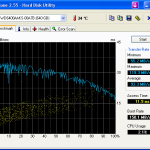
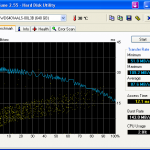
Does the WD Caviar Black really live up to the hype? I hate to say this, but no. It actually performed slower than my older WD 640 GB AAKS with a single processor and 16 MB cache!

Don’t believe me? Take a look below!

Test configuration: Intel Core 2 Duo E8400 @ 3 GHz, 4 GB Corsair XMS2 DDR2-800, Gigabyte P35-DS3L (F8b), Seasonic S12 600W power supply and of course, APC RS 1200VA regulated power. Operating system: Windows XP Professional w/ SP3. Both drives were imaged using Ghost 2003 and defragmented using PerfectDisk 2008 Professional. Software: HD Tune 2.55. Hard drive 1: WDC WD6400AAKS-00A7B and hard drive 2: WDC WD6401AALS-00L3B. AAM was confirmed as disabled on both drives using Hitachi’s Drive Fitness Test.

Each benchmark was run four times. Time for the benchmarks:

As you can see, the Caviar Black 640 GB doesn’t perform all that better than the Caviar Blue (SE16) 640 GB.

October 12, 2008

Since the Apple iPhone 3G made its debut in Canada approximately two months ago, it has become one of the best selling smartphones of all time.

I was initially wary of purchasing the iPhone due to the exorbitant data fees being charged, but I managed to get a 6 GB promotional data plan for $30/month from Rogers Wireless. I’m currently using 2.5% (or 150 MB) of my monthly data quota. As you can see, I overestimated my data usage by a long shot :-). Going to a cheaper data plan doesn’t make sense, as it only gives me 250 MB for $5 less now. In fact, Rogers recently stated that 90% of their data customers use less than 500 MB per month. As most of my data plan is going to waste, I wish I could share my data plan with my family, but Rogers doesn’t offer such an option at this time.

What’s there to like about the Apple iPhone 3G? The touch interface. The sleek form factor. WiFi connectivity. The ability to select and install hundreds of applications. Easy firmware upgrades.

There’s also a few negatives: occassional dropped calls, dismal battery life at times (improved with 2.1 firmware), random reboots (had one today!), non user replaceable battery and a few other gripes.

So, what do I use my iPhone for? In no particular order: email, financial market quotes, social networking, finding things and managing Linux servers.

A list of my favorite iPhone applications follows:
Bloomberg — offers updated financial market quotes, including commodities and currencies.
Facebook — iPhone interface for the popular social networking site.
Movies — view movie listings for theatres in your area; view trailers and showtimes.
UrbanSpoon — Use this to find a restaurant near you. Needs more cities added.
Locly — find nearby establishments and local events.
fring — connect with your IM buddies and make VOIP calls over Skype.
eBay — track and manage your eBay auctions. Search for items.
iSSH — manages SSH connections to my servers for remote diagnosis. $2.99.
Palringo — similar to fring, but no Skype support. I like the MSN interface they use.
Shazam — hear a tune you like on the radio? This app tells you the name and artist.
Units — great for unit conversion and limited currency conversion.
AirSharing — transfer files to your iPhone over WiFi. Share files with your buddies.

Leave a comment with your favorite iPhone apps.

September 23, 2008

I corrected an issue with the above products on my friend’s server today. Supposedly, the payment processor changed the SSL certificate used by their payment server and broke cURL payment processing for clients. The server in question was running Plesk 8.1.1 and CentOS.

Since the fix isn’t published online, I’ll post my fix here.

I noticed quite a few posts mentioned the cURL ‘-k’ flag, which bypasses the need for secure SSL communication. Using the ‘-k’ flag implies all transaction information is sent to the server in cleartext! That’s not something I approve of, nor something I would recommend to a friend or client.

So, what to do? First of all, I determined the path to the cURL CA bundle on the system.

grep -ir “curl” /etc
/etc/init.d/psa:CURL_CA_BUNDLE_FILE=/usr/share/curl/curl-ca-bundle.crt

From the output above, we determine that Plesk is looking for the cURL CA bundle in /usr/share/curl/ and that the filename should be curl-ca-bundle.crt.

Next, we need to download cacert.pem from http://curl.haxx.se/docs/caextract.html. I recommend using wget to download it to your server directly. You will need to rename the file to curl-ca-bundle.crt once it’s downloaded.

Copy curl-ca-bundle.crt to /usr/share/curl. If you get an error stating the path doesn’t exist, then you will need to create it using mkdir -p /usr/share/curl. Once the path exists, copy the file to the new path: cp curl-ca-bundle.crt /usr/share/curl.

This is where it gets tricky. Open curl-ca-bundle.crt in vim or your favorite editor and search for “Equifax Secure Global eBusiness CA”. Copy everything in the block, including that text and including END CERTIFICATE. We need to copy that block to one more file (search for ca-bundle.crt on your system): /usr/share/ssl/certs/ca-bundle.crt. Append the block to the bottom of the file. Remember to press ENTER after the last line. Of course, remember to ask your payment processor who their SSL vendor is and use the correct block.

Next, simply restart the Apache process: service httpd restart

That’s it. You should now be able to process transactions using cURL and SSL.

August 26, 2008

Our office received a fake invoice from Stock Quotes Professional Inc. last Friday.

We had no recollection of asking for a “rotating top banner with hyperlink” to our web site. The exact description on the invoice was: “Bi-annual online investor communications sponsorship”, followed by the hyperlink (spelled as hperlink) text above and then “International Stock Quotes”. The invoiced amount was $449 plus GST, amounting to $471.45.

Their web site is pathetic: www.stockquotespro.com. Who in the right mind would even want to post a banner there. It looks like a quick, five-minute web site. Take a look and see for yourself.

We called their toll-free number, 1-877-859-0117, to ask for clarification and were transferred to voice mail on two separate occasions. Further, I looked up the GST number in the CRA registry. I wasn’t shocked to see: “Not registered on the transaction date entered”.

Bottom-line: If you receive an invoice from Stock Quotes Professional Inc (Calgary, AB), do NOT pay it! As we have done, report them to the Better Business Bureau and the Canada Revenue Agency. A business is not allowed to charge GST unless it has been registered to collect GST.

Update (9/4/2008):

Another company, Walstreet International, Inc. (Toronto, Ontario), has followed suit. They are charging $399 bi-annually for the same service — a rotated corporate logo on their web site. There’s also a $19.95 charge for GST, but there’s no GST number (another red flag) on the invoice. The web site looks more reputable, but it’s a scam: www.walstreetintl.net. The small print on this one: “All subscriptions begin upon payment and automatically renewed bi-annually for 3 years.” The emphasis is mine. In other words, another scam to make a quick buck from unknowing accounts payable departments at publicly traded companies. Luckily it ended up in my hands — another scam to report. We called their toll-free number only to be forwarded to voicemail: 1.800.581.1559. Look at the culprit behind the domain: http://whois.domaintools.com/walstreetintl.net (scroll down to the whois record).

June 29, 2008

The architects from Dynamic Architecture Group have devised a rotating skyscraper to be built amongst the Dubai landscape.

The concept is interesting, to say the least. Strong wind gusts will rotate the skyscraper’s floors for an ever-changing design. Owners of apartments will likely awaken to a new view each morning.

Coming from a technical background, I can only wonder if the parts required between the floors are durable for long-term use. Oh wait, they have plenty of oil to use between floors!

Given that the architectural landscape of Dubai is similar to that of the Las Vegas Strip, once the investors have gained a sizeable return on investment, I’m sure they will tear it down and start anew.

June 23, 2008

I’m going to discuss a type of e-mail scam I’ve encountered lately. Actually, I find my spam box littered with dozens of these so-called “job offers”.

I bet we’ve all seen spam e-mails promising $4K to $10K per month (or $200 to $300 per day) in residual income for processing sales orders. Most individuals safely ignore these e-mails, but some seek further details.. and eventually get caught up as a helpless victim (or jump ship early).

There’s plenty of legitimate opportunities for residual income processing sales orders. However, there’s also ones that are clearly illegal. Let’s start with an example. Joe has a factory in Europe that makes shoes. Joe does $100K a month in sales and needs individuals to capture some of the American and Canadian market on his behalf. In doing so, Joe will pay you 10% of the sales volume that YOU process on his behalf. Joe expects you to wire 90% of the proceeds from YOUR sales to either your bank account or a bank account or his choice. Sound familiar?

Let’s break this example down a little. Joe wants you to set up shop on his behalf, in your own country. With the sales volumes Joe’s doing, he could easily set up shop in your country using various methods. Next, Joe wants to use your bank account to collect the funds. Never give out your banking information. On top of this, Joe wants you to set up a merchant account with an online order processor. Then, Joe promises you he’ll send you a couple hundred orders per month for you to process. Well, guess what? Those orders aren’t really “orders”. They are false orders created using STOLEN credit card numbers and customer data. Now, I hope you can put two and two together and see where I’m going with this (money laundering). In the end, you make nothing and actually lose money spent on credit card processing fees and chargebacks from unknowing “customers”.

In the end, you will be held accountable for YOUR actions, not Joe in Europe. If you have landed yourself in hot water by falling victim to such a “job offer”, I have information that can help you out.

Disclaimer: I discovered the information above a couple of years ago, being inquisitive and pressuring details out of a individual posing as a marketing manager for an online company. Sometimes, you just have to play dumb, but yet not fall victim.